


Who Can Rebuild a Bubble App That Has Stopped Scaling? Firms Compared (2026)

October 15, 2026

If you’ve ever launched a new B2B ecommerce platform and wondered why orders are still falling through the cracks six months later — the problem almost certainly isn’t the ecommerce platform.
It’s the ERP integration.
This is the conversation that most agencies avoid during sales, most platform vendors gloss over in demos, and most internal IT teams don’t fully understand until they’re three months into a go-live with customers complaining about wrong inventory counts and duplicate orders.
This guide explains what actually goes wrong with B2B ecommerce ERP integrations — and what to do about it before you’re in crisis mode.
In B2C ecommerce, the ERP (if there is one) is mostly a post-order system. Orders flow from the platform into the ERP for fulfillment. Inventory syncs once or twice a day. The data model is simple: products, orders, customers, and inventory.
In B2B ecommerce, the ERP is the system of record for almost everything that matters:
None of these are features you can buy off the shelf. They require a real integration architecture — and that architecture has to be planned before you build, not after.
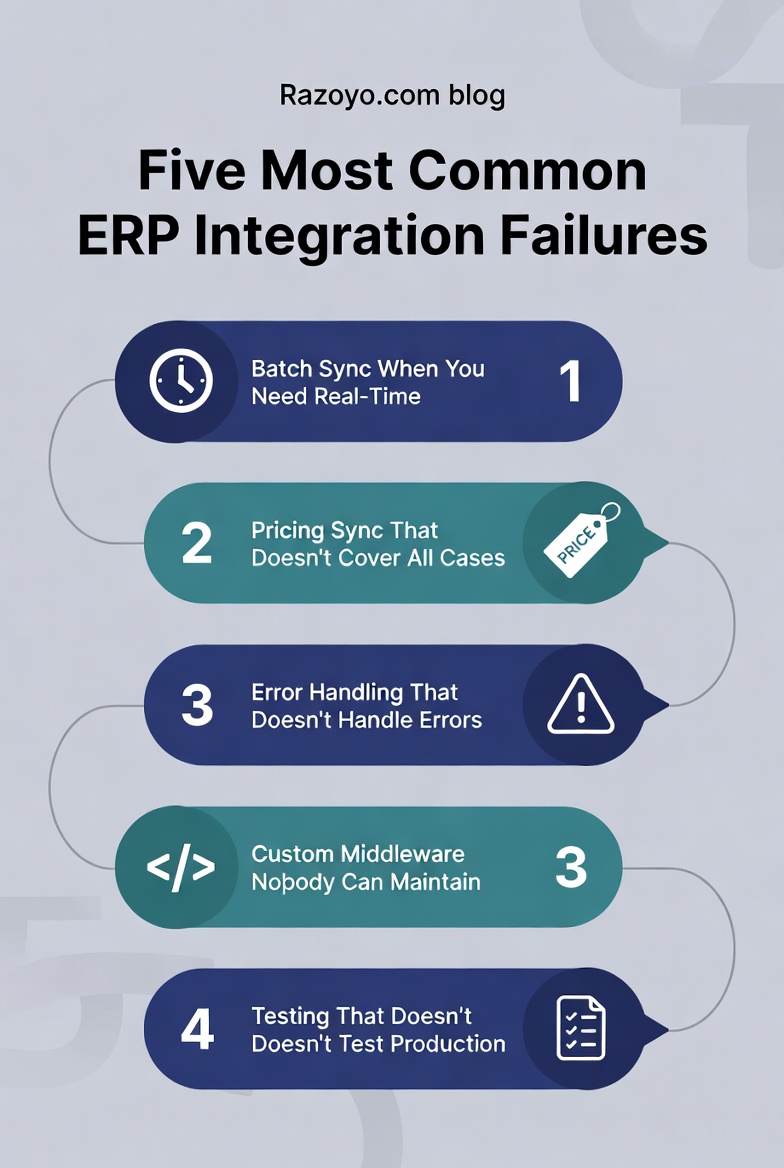
This is the most common failure mode. The integration team builds a nightly batch process to sync inventory from the ERP to the ecommerce platform. It works fine during testing.
Then you go live, and a customer places an order at 9 AM for an item that was just depleted by a sales rep order at 8 AM. The ecommerce platform shows 15 units available. The ERP shows 0. The order goes through, your warehouse team calls the customer to apologize, and the customer wonders why they’re using your portal at all.
We ran into exactly this challenge when building Hockey Monkey’s custom Magento storefront. With peak-season traffic spikes and a complex catalog spanning thousands of SKUs, product, inventory, and order data had to stay in sync across channels in near-real-time — not overnight. Getting that ERP and product information platform integration right was the difference between a storefront that scaled and one that collapsed under Black Friday volume.
For B2B distributors running significant daily order volume, near-real-time inventory sync (every 5–15 minutes) is table stakes — not a nice-to-have.
Customer-specific pricing sounds simple: pull the customer’s price list from the ERP and show it in the portal. But pricing in B2B ERPs is rarely that clean.
You might have: base price lists, customer-specific overrides, volume discount tiers, contract pricing with expiration dates, promotional pricing, cost-plus rules that vary by product category, and price holds that kick in during supply chain disruptions.
An integration that handles the 80% common case but misses the 20% edge cases will create a customer service nightmare. Your inside sales team will spend their days manually correcting orders and apologizing for incorrect prices.
The fix: Before building the pricing integration, document every pricing scenario that currently exists in your ERP. Then test the integration against all of them — not just the common ones.
Every ERP integration will encounter errors. The ERP will be unavailable during a maintenance window. The network will drop. A customer record will have invalid data. A product will be discontinued mid-order.
Integrations that don’t handle these cases gracefully will either fail silently (orders don’t make it to the ERP, nobody knows) or fail loudly (the customer sees a generic error and the order is lost).
When we built Christmas Designers’ Magento 2 platform with integrated CRM and ERP systems, one of the biggest wins was eliminating duplicate data entry across merchandising, customer data, and fulfillment. But that only worked because the integration layer handled errors cleanly — when one system hiccuped during their intense seasonal volume, the others didn’t fall over with it.
A production-grade B2B integration needs:
This is not glamorous. It’s also not optional.
We see this in about 30% of the projects where we’re brought in to rescue a migration. The previous agency built a custom middleware layer — scripts, APIs, or a homegrown message bus — that no longer has a developer who understands it.
The original developer left. Documentation is sparse or nonexistent. Every time something breaks, it takes days to diagnose because nobody knows how the code works. Every platform upgrade has to be tested against the custom middleware, which creates a drag on every future development effort.
When we migrated a B2B supplies distributor from Magento 1 to OroCommerce, the previous integration was exactly this kind of unmaintainable custom code. We replaced it with a documented, supported architecture — and the client’s operations team could finally troubleshoot integration issues without calling their agency.
The fix: Evaluate your options honestly. Off-the-shelf integration platforms like Celigo, Boomi, and MuleSoft exist and may work for straightforward scenarios — but they often fall short when B2B pricing logic, custom workflows, or legacy ERP quirks come into play. In many cases, a well-architected custom integration built by a team that understands your ERP will outperform a generic connector that promises plug-and-play but delivers months of workarounds. The right answer depends on your company’s integration complexity, internal engineering capacity, and how much your ERP deviates from standard configurations.
Developers test with clean, synthetic data in a staging environment. Production has 15 years of messy customer records, discontinued products still in active price lists, special characters in company names that break XML parsers, and edge-case order scenarios that nobody thought to document.
B2B ERP integrations need to be tested with real production data (or a full anonymized replica) against real edge cases. This takes longer. It surfaces problems earlier. It is absolutely worth it.
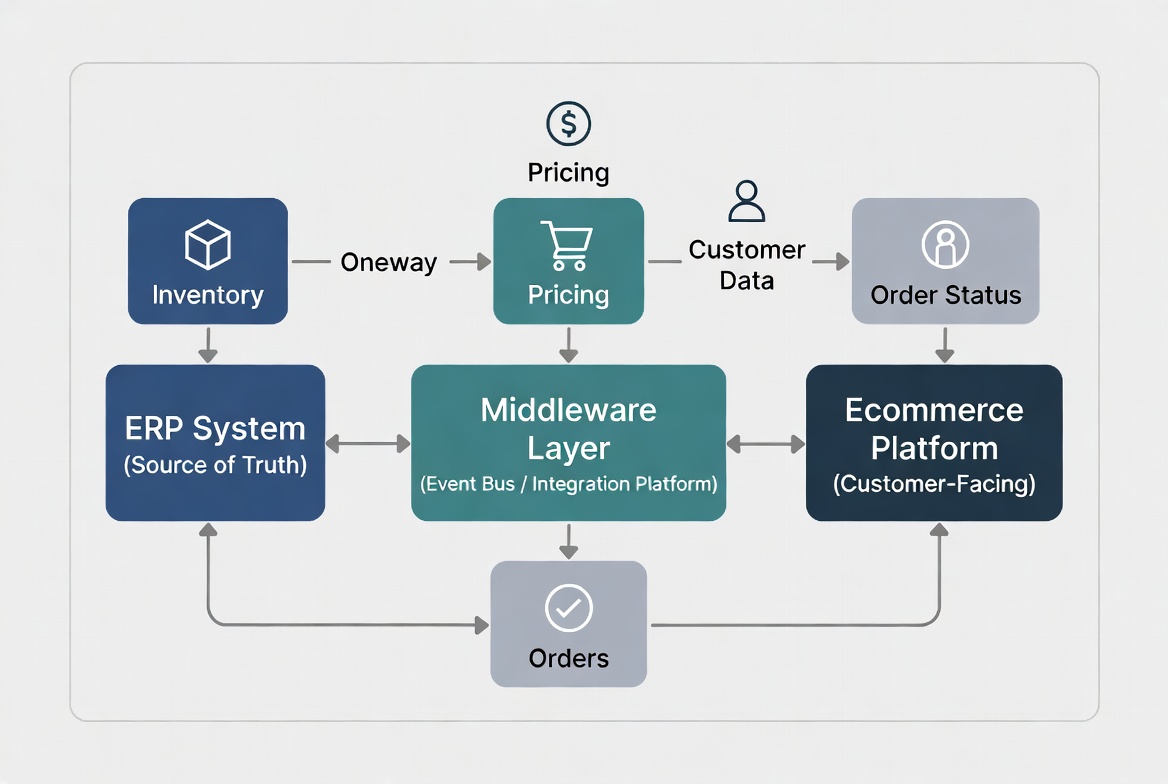
At Razoyo, after 80+ B2B platform builds, we’ve settled on an architecture that handles the failure modes above:
Event-driven, not batch-driven. Inventory, order status, and pricing changes in the ERP trigger events that propagate to the ecommerce platform in near-real-time. Batch processes are only used for bulk operations (like nightly catalog updates for non-time-sensitive data).
A maintainable integration layer. Whether you use an off-the-shelf integration platform or build custom API bridges, the integration layer must be something your team can operate, monitor, and debug without calling the people who built it. When we built a B2B ecommerce platform for an automobile dealership supplier, we connected their legacy SAGE ERP through LogicBroker alongside an Akeneo PIM — a stack designed so the client’s own team could maintain it long-term. In many of our projects, a purpose-built custom integration ends up being more maintainable than a generic platform, because it maps directly to the client’s actual data model and workflows instead of forcing everything through a one-size-fits-all connector.
Explicit error handling and monitoring. Every integration endpoint has retry logic, dead-letter handling, and alerting. We set up dashboards so the client can see integration health without calling their agency.
ERP-first data model. The ERP is the source of truth. The ecommerce platform is a read layer for customers. This seems obvious but a lot of integrations get built backwards — and it causes endless data sync conflicts.
Phased rollout. We never go live to all customers on day one. We onboard pilot accounts, monitor error rates, fix issues, then expand. This is how you avoid a catastrophic go-live.
This same architecture has scaled from mid-market distributors to Fortune 500 companies, where we connected BigCommerce with Salesforce Marketing Cloud, CrownPeak CMS, and the client’s enterprise ERP — all deployed in under five weeks.
Here are the five questions to answer before you write a single line of integration code — or hire an agency:
If you can’t answer these questions, you’re not ready to build yet. Invest 4 weeks in discovery first — it will save 6 months of post-launch firefighting.
The ecommerce platform gets all the attention. The ERP integration does all the actual work.
The companies that build successful B2B ecommerce operations treat ERP integration as a first-class project requirement — not an afterthought. They scope it early, test it thoroughly, and build it on a maintainable architecture.
The companies that struggle treat it as a checkbox. They discover the true complexity at the worst possible time: when their best customers are calling to complain.
Don’t be in the second group.
The service behind this, with scope and pricing, is on our ERP integration for B2B ecommerce page.
Razoyo specializes in B2B ecommerce builds with complex ERP integration requirements. We’ve worked with NetSuite, SAP Business One, Epicor, Acumatica, Microsoft Dynamics, and several industry-specific ERP systems.
If you’re planning a platform build or migration and want an honest assessment of your integration complexity — before you commit to a scope and budget — we’re happy to talk.
Book a Free 30-Minute Consultation
Razoyo is a B2B ecommerce development firm with 80+ platform builds for manufacturers, distributors, and wholesalers. We specialize in the hard stuff: complex ERP integrations, B2B portal development, and platform migrations for mid-market B2B companies.
These links open AI platforms with pre-written prompts about this page.
We use cookies to improve your experience. Do you accept?
To find out more about the types of cookies, as well as who sends them on our website, please visit our cookie policy and privacy policy.

